# Qwen3-VL
**Repository Path**: netidol_admin/Qwen3-VL
## Basic Information
- **Project Name**: Qwen3-VL
- **Description**: No description available
- **Primary Language**: Unknown
- **License**: Apache-2.0
- **Default Branch**: main
- **Homepage**: None
- **GVP Project**: No
## Statistics
- **Stars**: 0
- **Forks**: 0
- **Created**: 2025-10-07
- **Last Updated**: 2025-10-07
## Categories & Tags
**Categories**: Uncategorized
**Tags**: None
## README
# Qwen3-VL
💜 Qwen Chat | 🤗 Hugging Face | 🤖 ModelScope | 📑 Blog | 📚 Cookbooks | 📑 Paper is coming
🖥️ Demo | 💬 WeChat (微信) | 🫨 Discord | 📑 API | 🖥️ PAI-DSW
## Introduction
Meet Qwen3-VL — the most powerful vision-language model in the Qwen series to date.
This generation delivers comprehensive upgrades across the board: superior text understanding & generation, deeper visual perception & reasoning, extended context length, enhanced spatial and video dynamics comprehension, and stronger agent interaction capabilities.
Available in Dense and MoE architectures that scale from edge to cloud, with Instruct and reasoning‑enhanced Thinking editions for flexible, on‑demand deployment.
#### Key Enhancements:
* **Visual Agent**: Operates PC/mobile GUIs—recognizes elements, understands functions, invokes tools, completes tasks.
* **Visual Coding Boost**: Generates Draw.io/HTML/CSS/JS from images/videos.
* **Advanced Spatial Perception**: Judges object positions, viewpoints, and occlusions; provides stronger 2D grounding and enables 3D grounding for spatial reasoning and embodied AI.
* **Long Context & Video Understanding**: Native 256K context, expandable to 1M; handles books and hours-long video with full recall and second-level indexing.
* **Enhanced Multimodal Reasoning**: Excels in STEM/Math—causal analysis and logical, evidence-based answers.
* **Upgraded Visual Recognition**: Broader, higher-quality pretraining is able to “recognize everything”—celebrities, anime, products, landmarks, flora/fauna, etc.
* **Expanded OCR**: Supports 32 languages (up from 10); robust in low light, blur, and tilt; better with rare/ancient characters and jargon; improved long-document structure parsing.
* **Text Understanding on par with pure LLMs**: Seamless text–vision fusion for lossless, unified comprehension.
#### Model Architecture Updates:
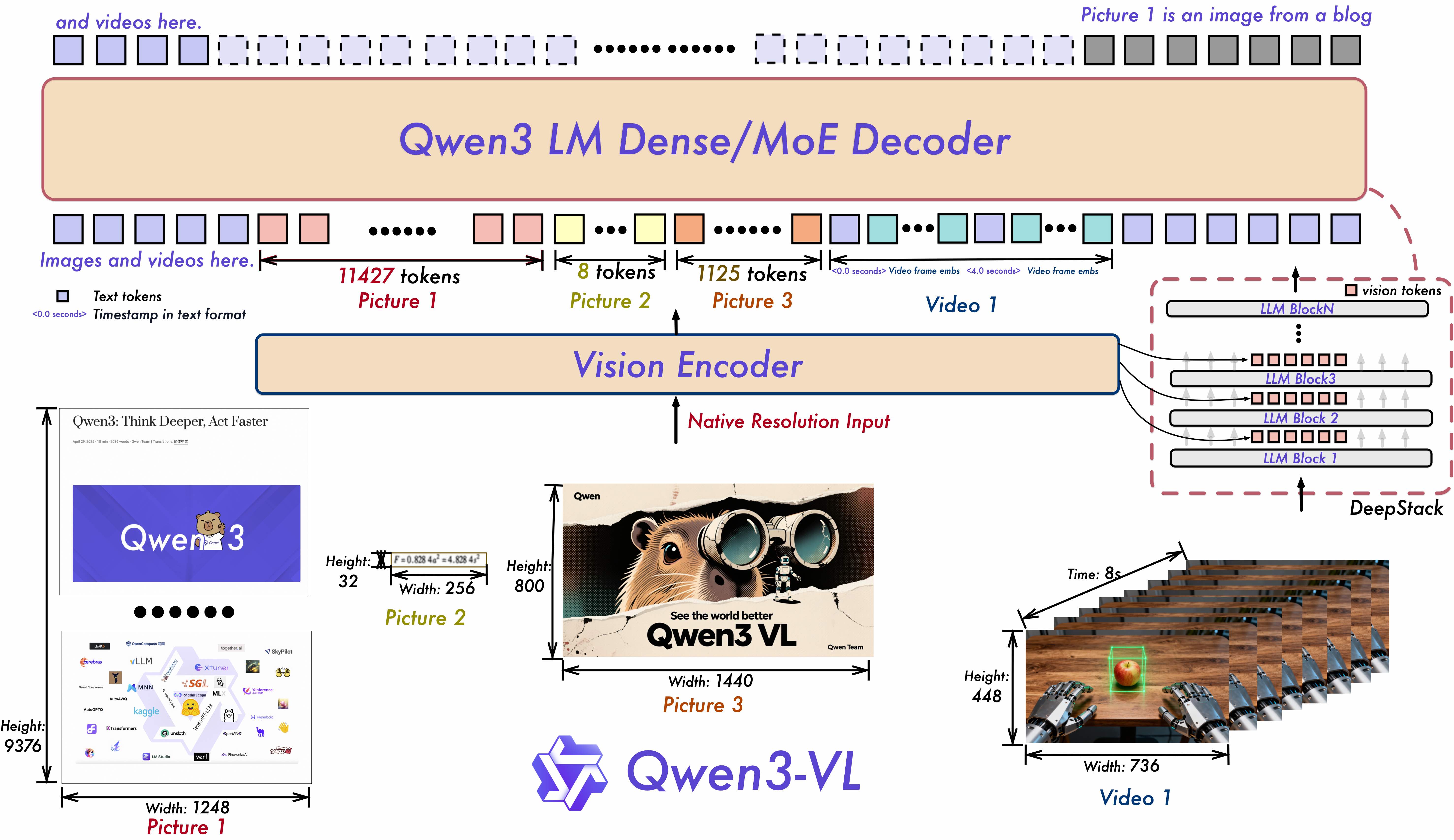
1. **Interleaved-MRoPE**: Full‑frequency allocation over time, width, and height via robust positional embeddings, enhancing long‑horizon video reasoning.
2. **DeepStack**: Fuses multi‑level ViT features to capture fine‑grained details and sharpen image–text alignment.
3. **Text–Timestamp Alignment:** Moves beyond T‑RoPE to precise, timestamp‑grounded event localization for stronger video temporal modeling.
## News
* 2025.10.4: We have released the [Qwen3-VL-30B-A3B-Instruct](https://huggingface.co/Qwen/Qwen3-VL-30B-A3B-Instruct) and [Qwen3-VL-30B-A3B-Thinking](https://huggingface.co/Qwen/Qwen3-VL-30B-A3B-Thinking). We have also released the FP8 version of the Qwen3-VL models — available in our [HuggingFace collection](https://huggingface.co/collections/Qwen/qwen3-vl-68d2a7c1b8a8afce4ebd2dbe) and [ModelScope collection](https://modelscope.cn/collections/Qwen3-VL-5c7a94c8cb144b).
* 2025.09.23: We have released the [Qwen3-VL-235B-A22B-Instruct](https://huggingface.co/Qwen/Qwen3-VL-235B-A22B-Instruct) and [Qwen3-VL-235B-A22B-Thinking](https://huggingface.co/Qwen/Qwen3-VL-235B-A22B-Thinking). For more details, please check our [blog](https://qwen.ai/blog?id=99f0335c4ad9ff6153e517418d48535ab6d8afef&from=research.latest-advancements-list)!
* 2025.04.08: We provide the [code](https://github.com/QwenLM/Qwen2.5-VL/tree/main/qwen-vl-finetune) for fine-tuning Qwen2-VL and Qwen2.5-VL.
* 2025.03.25: We have released the [Qwen2.5-VL-32B](https://huggingface.co/Qwen/Qwen2.5-VL-32B-Instruct). It is smarter and its responses align more closely with human preferences. For more details, please check our [blog](https://qwenlm.github.io/blog/qwen2.5-vl-32b/)!
* 2025.02.20: we have released the [Qwen2.5-VL Technical Report](https://arxiv.org/abs/2502.13923). Alongside the report, we have also released AWQ-quantized models for Qwen2.5-VL in three different sizes: [3B](https://huggingface.co/Qwen/Qwen2.5-VL-3B-Instruct-AWQ), [7B](https://huggingface.co/Qwen/Qwen2.5-VL-7B-Instruct-AWQ) , and [72B](https://huggingface.co/Qwen/Qwen2.5-VL-72B-Instruct-AWQ) parameters.
* 2025.01.28: We have released the [Qwen2.5-VL series](https://huggingface.co/Qwen). For more details, please check our [blog](https://qwenlm.github.io/blog/qwen2.5-vl/)!
* 2024.12.25: We have released the [QvQ-72B-Preview](https://huggingface.co/Qwen/QVQ-72B-Preview). QvQ-72B-Preview is an experimental research model, focusing on enhancing visual reasoning capabilities. For more details, please check our [blog](https://qwenlm.github.io/blog/qvq-72b-preview/)!
* 2024.09.19: The instruction-tuned [Qwen2-VL-72B model](https://huggingface.co/Qwen/Qwen2-VL-72B-Instruct) and its quantized version [[AWQ](https://huggingface.co/Qwen/Qwen2-VL-72B-Instruct-AWQ), [GPTQ-Int4](https://huggingface.co/Qwen/Qwen2-VL-72B-Instruct-GPTQ-Int4), [GPTQ-Int8](https://huggingface.co/Qwen/Qwen2-VL-72B-Instruct-GPTQ-Int8)] are now available. We have also released the [Qwen2-VL paper](https://arxiv.org/pdf/2409.12191) simultaneously.
* 2024.08.30: We have released the [Qwen2-VL series](https://huggingface.co/collections/Qwen/qwen2-vl-66cee7455501d7126940800d). The 2B and 7B models are now available, and the 72B model for open source is coming soon. For more details, please check our [blog](https://qwenlm.github.io/blog/qwen2-vl/)!
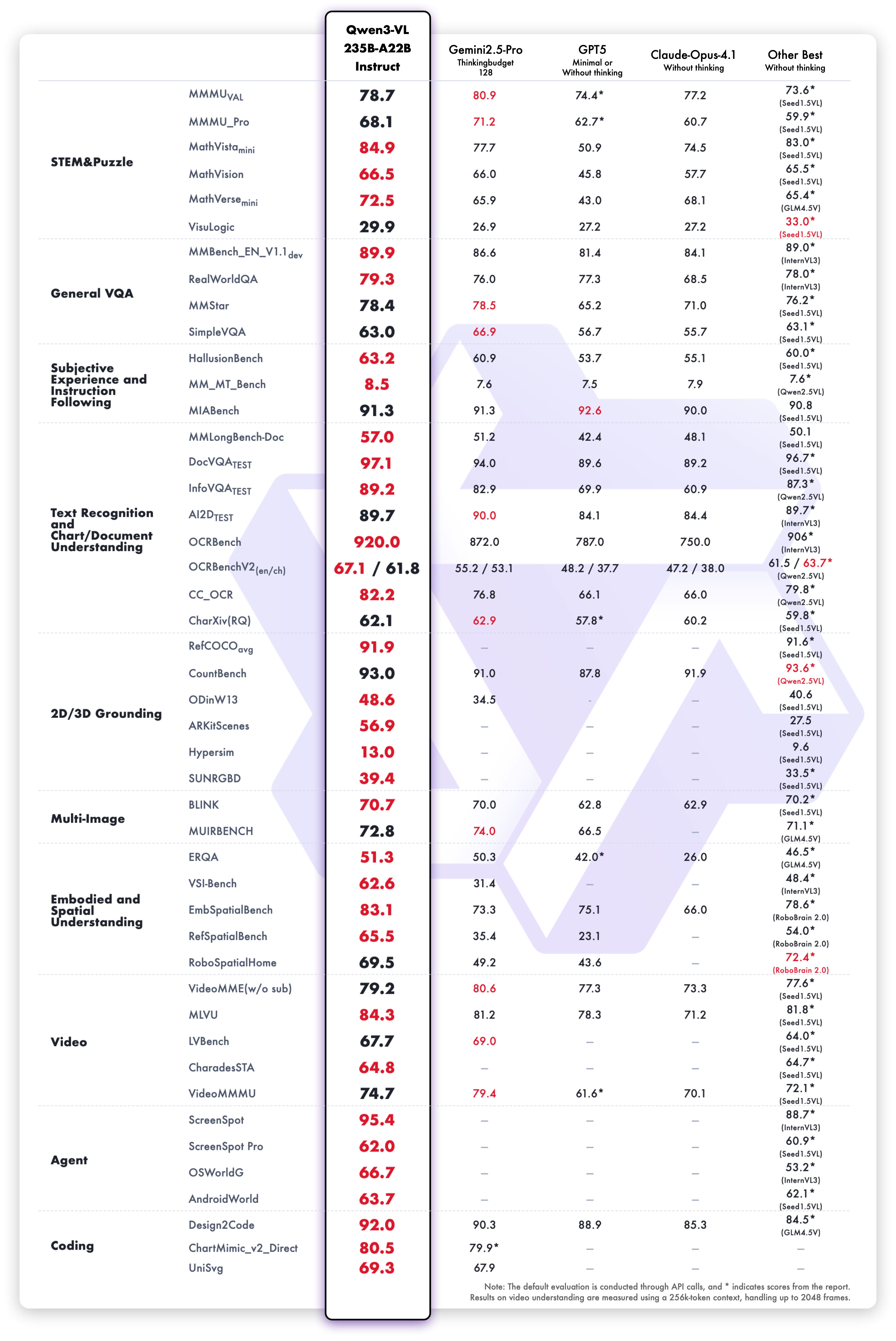
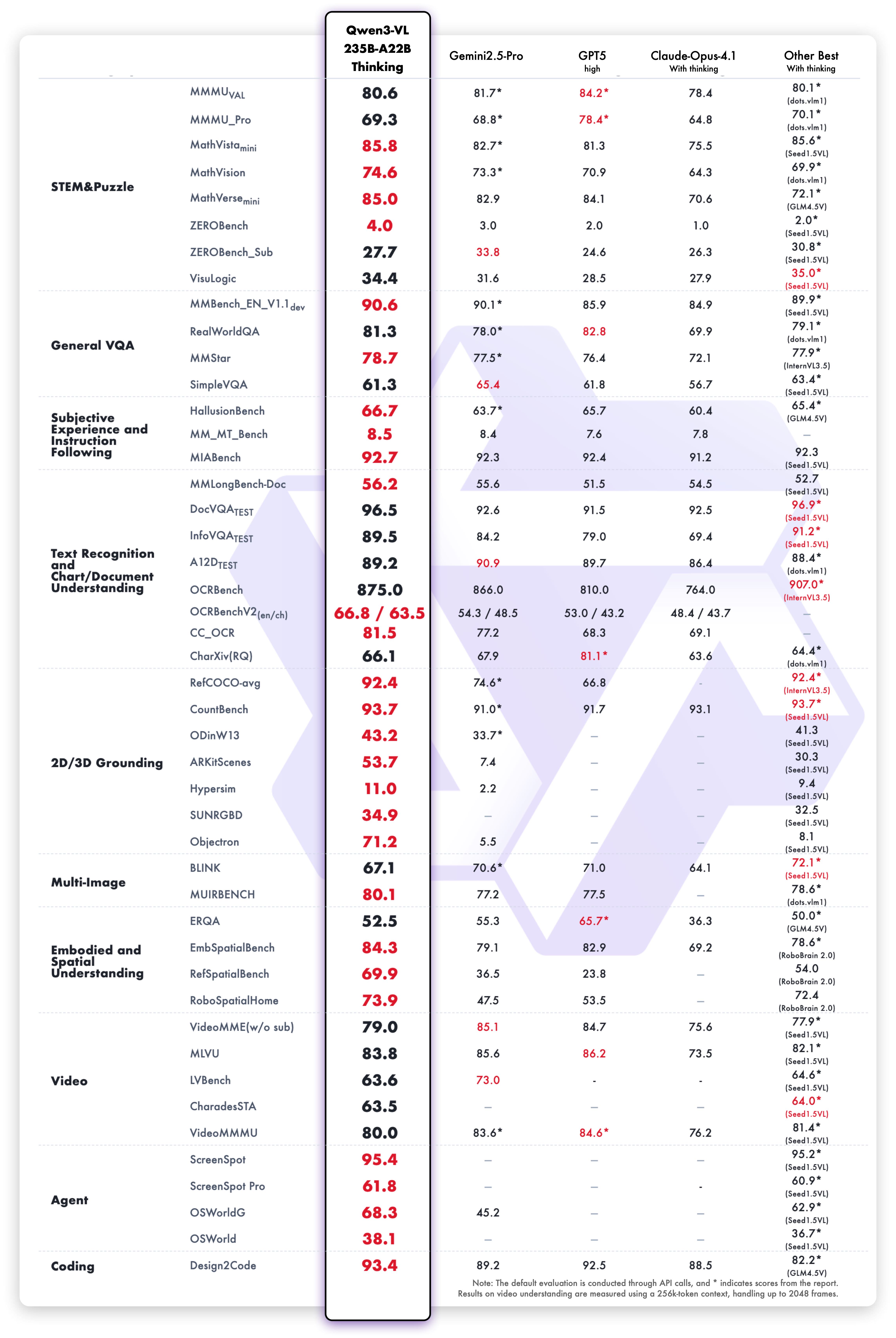
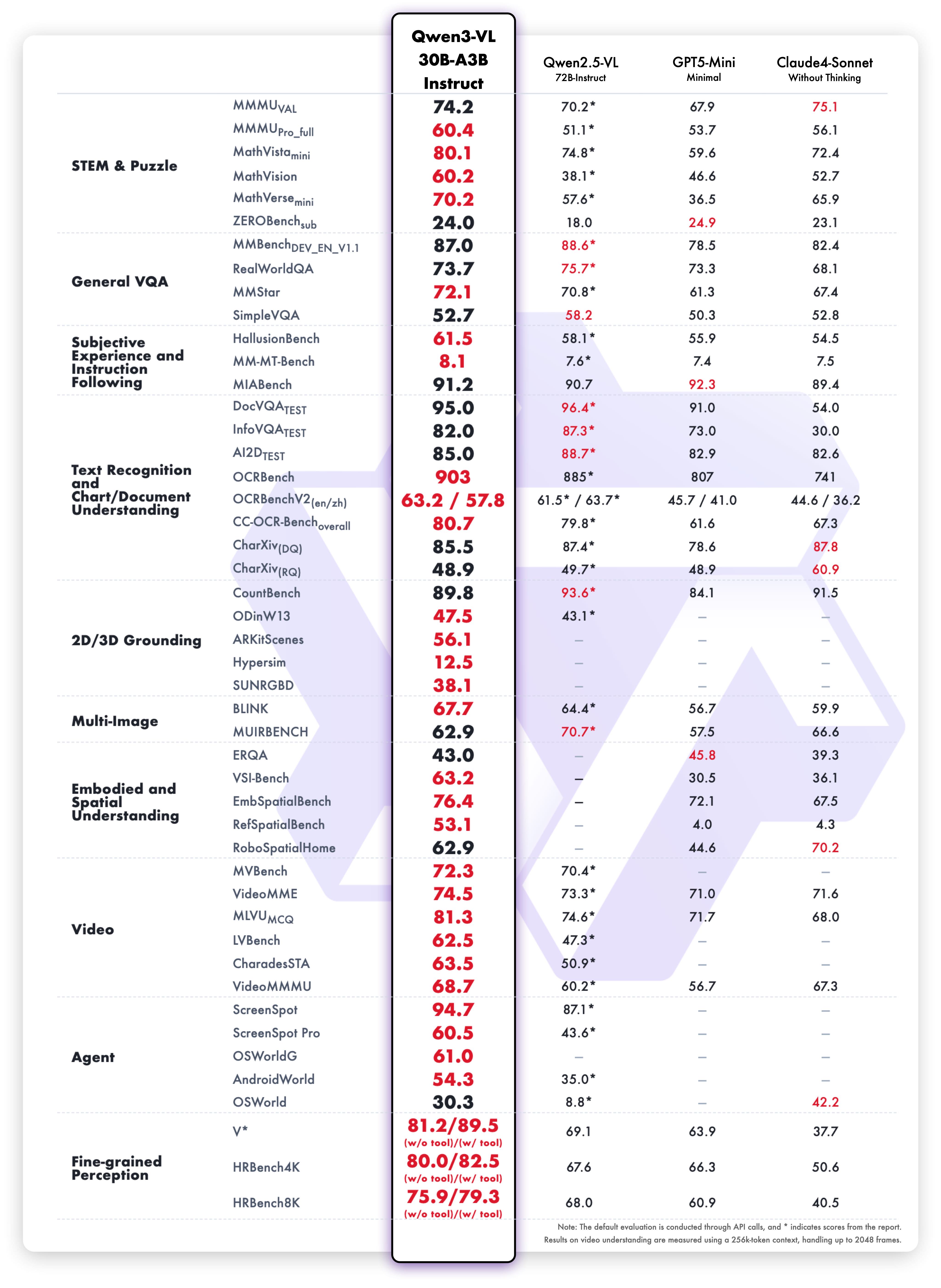
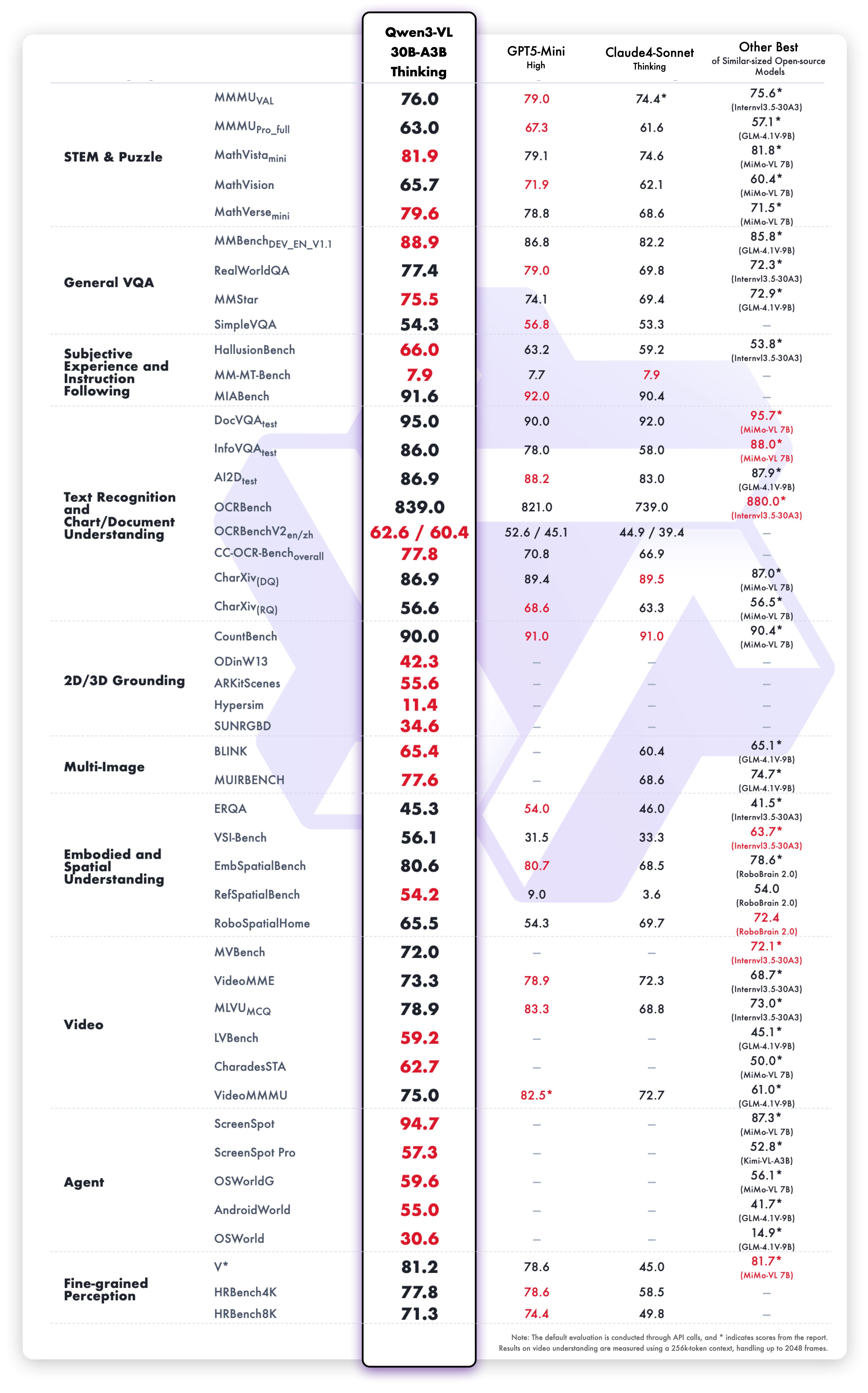
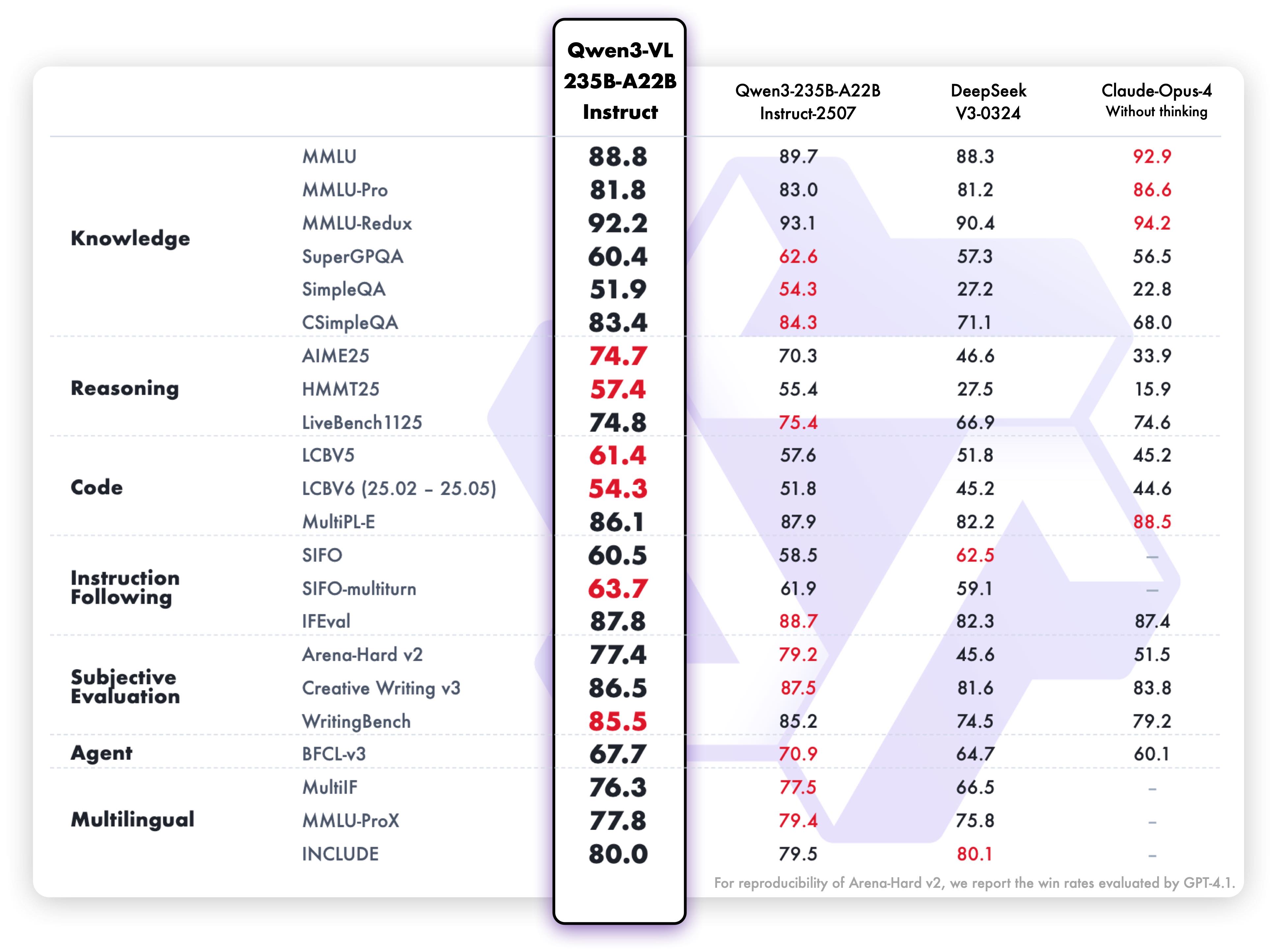
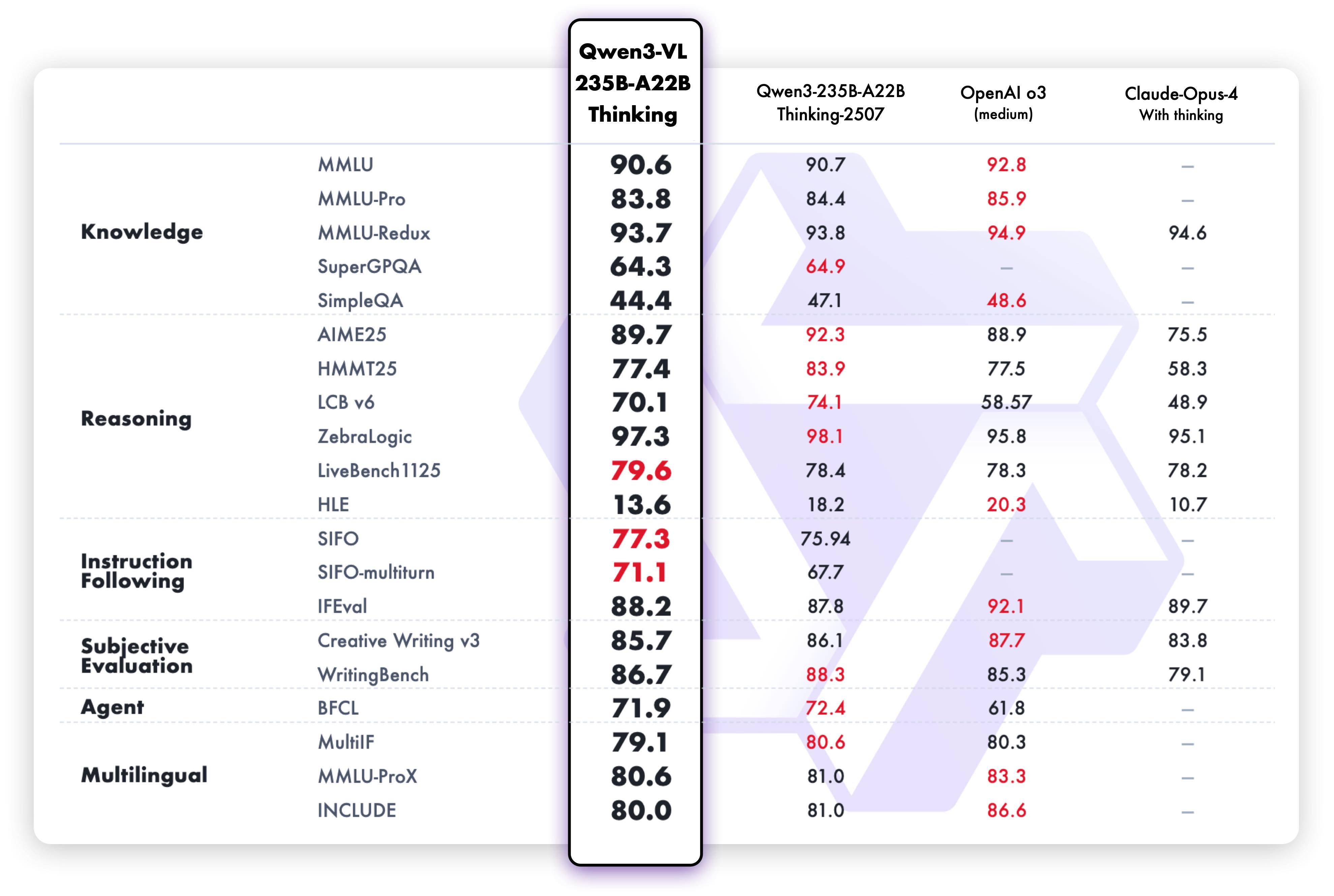
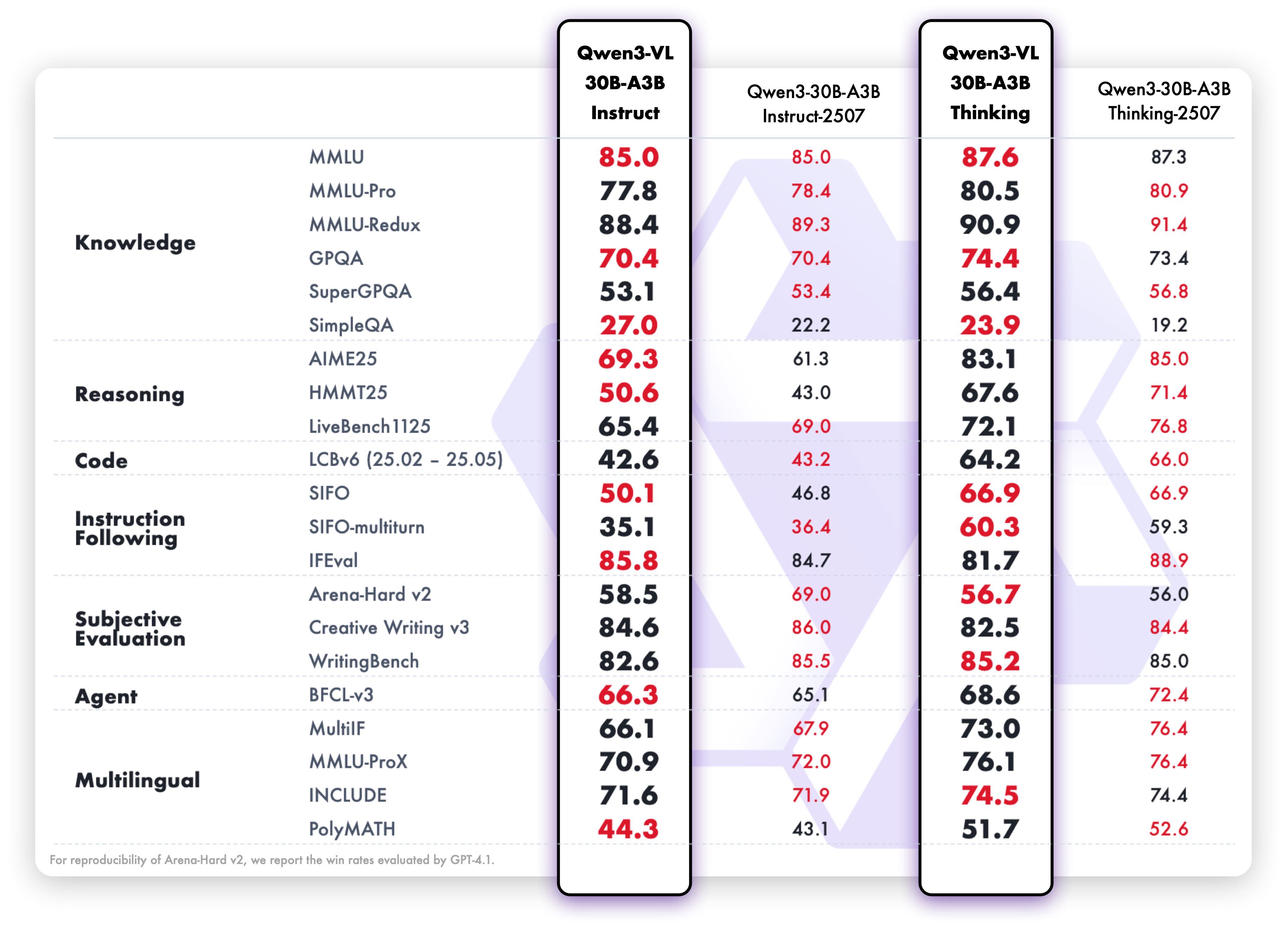
## Performance
### Visual Tasks
### Text-Centric Tasks
## Cookbooks
We are preparing [cookbooks](https://github.com/QwenLM/Qwen3-VL/tree/main/cookbooks) for many capabilities, including recognition, localization, document parsing, video understanding, key information extraction, and more. Welcome to learn more!
| Cookbook | Description | Open |
| -------- | ----------- | ---- |
| [Omni Recognition](https://github.com/QwenLM/Qwen3-VL/blob/main/cookbooks/omni_recognition.ipynb) | Not only identify animals, plants, people, and scenic spots but also recognize various objects such as cars and merchandise. | [](https://colab.research.google.com/github/QwenLM/Qwen3-VL/blob/main/cookbooks/omni_recognition.ipynb) |
| [Powerful Document Parsing Capabilities](https://github.com/QwenLM/Qwen3-VL/blob/main/cookbooks/document_parsing.ipynb) | The parsing of documents has reached a higher level, including not only text but also layout position information and our Qwen HTML format. | [](https://colab.research.google.com/github/QwenLM/Qwen3-VL/blob/main/cookbooks/document_parsing.ipynb) |
| [Precise Object Grounding Across Formats](https://github.com/QwenLM/Qwen3-VL/blob/main/cookbooks/2d_grounding.ipynb) | Using relative position coordinates, it supports both boxes and points, allowing for diverse combinations of positioning and labeling tasks. | [](https://colab.research.google.com/github/QwenLM/Qwen3-VL/blob/main/cookbooks/2d_grounding.ipynb) |
| [General OCR and Key Information Extraction](https://github.com/QwenLM/Qwen3-VL/blob/main/cookbooks/ocr.ipynb) | Stronger text recognition capabilities in natural scenes and multiple languages, supporting diverse key information extraction needs. | [](https://colab.research.google.com/github/QwenLM/Qwen3-VL/blob/main/cookbooks/ocr.ipynb) |
| [Video Understanding](https://github.com/QwenLM/Qwen3-VL/blob/main/cookbooks/video_understanding.ipynb) | Better video OCR, long video understanding, and video grounding. | [](https://colab.research.google.com/github/QwenLM/Qwen3-VL/blob/main/cookbooks/video_understanding.ipynb) |
| [Mobile Agent](https://github.com/QwenLM/Qwen3-VL/blob/main/cookbooks/mobile_agent.ipynb) | Locate and think for mobile phone control. | [](https://colab.research.google.com/github/QwenLM/Qwen3-VL/blob/main/cookbooks/mobile_agent.ipynb) |
| [Computer-Use Agent](https://github.com/QwenLM/Qwen3-VL/blob/main/cookbooks/computer_use.ipynb) | Locate and think for controlling computers and Web. | [](https://colab.research.google.com/github/QwenLM/Qwen3-VL/blob/main/cookbooks/computer_use.ipynb) |
| [3D Grounding](https://github.com/QwenLM/Qwen3-VL/blob/main/cookbooks/3d_grounding.ipynb) | Provide accurate 3D bounding boxes for both indoor and outdoor objects. | [](https://colab.research.google.com/github/QwenLM/Qwen3-VL/blob/main/cookbooks/3d_grounding.ipynb) |
| [Thinking with Images](https://github.com/QwenLM/Qwen3-VL/blob/main/cookbooks/think_with_images.ipynb) | Utilize image_zoom_in_tool and search_tool to facilitate the model’s precise comprehension of fine-grained visual details within images. | [](https://colab.research.google.com/github/QwenLM/Qwen3-VL/blob/main/cookbooks/think_with_images.ipynb) |
| [MultiModal Coding](https://github.com/QwenLM/Qwen3-VL/blob/main/cookbooks/mmcode.ipynb) | Generate accurate code based on rigorous comprehension of multimodal information. | [](https://colab.research.google.com/github/QwenLM/Qwen3-VL/blob/main/cookbooks/mmcode.ipynb) |
| [Long Document Understanding](https://github.com/QwenLM/Qwen3-VL/blob/main/cookbooks/long_document_understanding.ipynb) | Achieve rigorous semantic comprehension of ultra-long documents. | [](https://colab.research.google.com/github/QwenLM/Qwen3-VL/blob/main/cookbooks/long_document_understanding.ipynb) |
| [Spatial Understanding](https://github.com/QwenLM/Qwen3-VL/blob/main/cookbooks/spatial_understanding.ipynb) | See, understand and reason about the spatial information | [](https://colab.research.google.com/github/QwenLM/Qwen3-VL/blob/main/cookbooks/spatial_understanding.ipynb) |
## Quickstart
Below, we provide simple examples to show how to use Qwen3-VL with 🤖 ModelScope and 🤗 Transformers.
The code of Qwen3-VL has been in the latest Hugging face transformers and we advise you to build from source with command:
```
pip install git+https://github.com/huggingface/transformers
# pip install transformers==4.57.0 # currently, V4.57.0 is not released
```
### 🤖 ModelScope
We strongly advise users especially those in mainland China to use ModelScope. `snapshot_download` can help you solve issues concerning downloading checkpoints.
### Using 🤗 Transformers to Chat
Here we show a code snippet to show you how to use the chat model with `transformers`:
```python
from transformers import AutoModelForImageTextToText, AutoProcessor
# default: Load the model on the available device(s)
model = AutoModelForImageTextToText.from_pretrained(
"Qwen/Qwen3-VL-235B-A22B-Instruct", dtype="auto", device_map="auto"
)
# We recommend enabling flash_attention_2 for better acceleration and memory saving, especially in multi-image and video scenarios.
# model = AutoModelForImageTextToText.from_pretrained(
# "Qwen/Qwen3-VL-235B-A22B-Instruct",
# dtype=torch.bfloat16,
# attn_implementation="flash_attention_2",
# device_map="auto",
# )
processor = AutoProcessor.from_pretrained("Qwen/Qwen3-VL-235B-A22B-Instruct")
messages = [
{
"role": "user",
"content": [
{
"type": "image",
"image": "https://qianwen-res.oss-cn-beijing.aliyuncs.com/Qwen-VL/assets/demo.jpeg",
},
{"type": "text", "text": "Describe this image."},
],
}
]
# Preparation for inference
inputs = processor.apply_chat_template(
messages,
tokenize=True,
add_generation_prompt=True,
return_dict=True,
return_tensors="pt"
)
inputs = inputs.to(model.device)
# Inference: Generation of the output
generated_ids = model.generate(**inputs, max_new_tokens=128)
generated_ids_trimmed = [
out_ids[len(in_ids) :] for in_ids, out_ids in zip(inputs.input_ids, generated_ids)
]
output_text = processor.batch_decode(
generated_ids_trimmed, skip_special_tokens=True, clean_up_tokenization_spaces=False
)
print(output_text)
```
Multi image inference
```python
# Messages containing multiple images and a text query
messages = [
{
"role": "user",
"content": [
{"type": "image", "image": "file:///path/to/image1.jpg"},
{"type": "image", "image": "file:///path/to/image2.jpg"},
{"type": "text", "text": "Identify the similarities between these images."},
],
}
]
# Preparation for inference
inputs = processor.apply_chat_template(
messages,
tokenize=True,
add_generation_prompt=True,
return_dict=True,
return_tensors="pt"
)
inputs = inputs.to(model.device)
# Inference: Generation of the output
generated_ids = model.generate(**inputs, max_new_tokens=128)
generated_ids_trimmed = [
out_ids[len(in_ids) :] for in_ids, out_ids in zip(inputs.input_ids, generated_ids)
]
output_text = processor.batch_decode(
generated_ids_trimmed, skip_special_tokens=True, clean_up_tokenization_spaces=False
)
print(output_text)
```
Video inference
```python
# Messages containing a video url(or a local path) and a text query
messages = [
{
"role": "user",
"content": [
{
"type": "video",
"video": "https://qianwen-res.oss-cn-beijing.aliyuncs.com/Qwen2-VL/space_woaudio.mp4",
},
{"type": "text", "text": "Describe this video."},
],
}
]
# Preparation for inference
inputs = processor.apply_chat_template(
messages,
tokenize=True,
add_generation_prompt=True,
return_dict=True,
return_tensors="pt"
)
inputs = inputs.to(model.device)
# Inference: Generation of the output
generated_ids = model.generate(**inputs, max_new_tokens=128)
generated_ids_trimmed = [
out_ids[len(in_ids) :] for in_ids, out_ids in zip(inputs.input_ids, generated_ids)
]
output_text = processor.batch_decode(
generated_ids_trimmed, skip_special_tokens=True, clean_up_tokenization_spaces=False
)
print(output_text)
```
Batch inference
```python
# for batch generation, padding_side should be set to left!
processor.tokenizer.padding_side = 'left'
# Sample messages for batch inference
messages1 = [
{
"role": "user",
"content": [
{"type": "image", "image": "file:///path/to/image1.jpg"},
{"type": "image", "image": "file:///path/to/image2.jpg"},
{"type": "text", "text": "What are the common elements in these pictures?"},
],
}
]
messages2 = [
{"role": "system", "content": [{"type": "text", "text": "You are a helpful assistant."}]},
{"role": "user", "content": [{"type": "text", "text": "Who are you?"}]},
]
# Combine messages for batch processing
messages = [messages1, messages2]
# Preparation for inference
inputs = processor.apply_chat_template(
messages,
tokenize=True,
add_generation_prompt=True,
return_dict=True,
return_tensors="pt",
padding=True # padding should be set for batch generation!
)
inputs = inputs.to(model.device)
# Inference: Generation of the output
generated_ids = model.generate(**inputs, max_new_tokens=128)
generated_ids_trimmed = [
out_ids[len(in_ids) :] for in_ids, out_ids in zip(inputs.input_ids, generated_ids)
]
output_text = processor.batch_decode(
generated_ids_trimmed, skip_special_tokens=True, clean_up_tokenization_spaces=False
)
print(output_text)
```
Pixel Control via Official Processor
Using the official HF processor, we can conveniently control the budget of visual tokens. Since the Qwen3-VL processor separates image and video processing, we can independently configure the pixel budget for each modality.
- **For the image processor**:
The parameter `size['longest_edge']` originally corresponds to `max_pixels`, which defines the maximum number of pixels allowed for an image (i.e., for an image of height H and width W, H × W must not exceed `max_pixels`; image channels are ignored for simplicity).
Similarly, `size['shortest_edge']` corresponds to `min_pixels`, specifying the minimum allowable pixel count for an image.
- **For the video processor**:
The interpretation differs slightly. `size['longest_edge']` represents the maximum total number of pixels across all frames in a video — for a video of shape T×H×W, the product T×H×W must not exceed `size['longest_edge']`.
Similarly, `size['shortest_edge']` sets the minimum total pixel budget for the video.
```python
processor = AutoProcessor.from_pretrained("Qwen/Qwen3-VL-235B-A22B-Instruct")
# budget for image processor, since the compression ratio is 32 for Qwen3-VL, we can set the number of visual tokens of a single image to 256-1280
processor.image_processor.size = {"longest_edge": 1280*32*32, "shortest_edge": 256*32*32}
# budget for video processor, we can set the number of visual tokens of a single video to 256-16384
processor.video_processor.size = {"longest_edge": 16384*32*32, "shortest_edge": 256*32*32}
```
- You can further control the **sample fps** or **sample frames** of video, as shown below.
```python
messages = [
{
"role": "user",
"content": [
{
"type": "video",
"video": "https://qianwen-res.oss-cn-beijing.aliyuncs.com/Qwen2-VL/space_woaudio.mp4",
},
{"type": "text", "text": "Describe this video."},
],
}
]
# for video input, we can further control the fps or num_frames. \
# defaultly, fps is set to 2
# set fps = 4
inputs = processor.apply_chat_template(
messages,
tokenize=True,
add_generation_prompt=True,
return_dict=True,
return_tensors="pt",
fps=4
)
inputs = inputs.to(model.device)
# set num_frames = 128 and overwrite the fps to None!
# inputs = processor.apply_chat_template(
# messages,
# tokenize=True,
# add_generation_prompt=True,
# return_dict=True,
# return_tensors="pt",
# num_frames=128,
# fps=None,
# )
# inputs = inputs.to(model.device)
# Inference: Generation of the output
generated_ids = model.generate(**inputs, max_new_tokens=128)
generated_ids_trimmed = [
out_ids[len(in_ids) :] for in_ids, out_ids in zip(inputs.input_ids, generated_ids)
]
output_text = processor.batch_decode(
generated_ids_trimmed, skip_special_tokens=True, clean_up_tokenization_spaces=False
)
print(output_text)
```
### New `qwen-vl-utils` Usage
With the latest `qwen-vl-utils` toolkit (backward compatible with Qwen2.5-VL), you can control pixel constraints per visual input.
```bash
pip install qwen-vl-utils==0.0.14
# It's highly recommended to use `[decord]` feature for faster video loading.
# pip install qwen-vl-utils[decord]
```
Compared to previous version, the new `qwen-vl-utils` introduces:
- "image_patch_size": `14` for Qwen2.5-VL and `16` for Qwen3-VL. Default set to `14`.
- "return_video_metadata"(Qwen3-VL only): Due to the new video processor, if True, each video returns as (video_tensor, video_metadata). Default set to `False`.
```python
# for Qwen2.5VL, you can simply call
images, videos, video_kwargs = process_vision_info(messages, return_video_kwargs=True)
# For Qwen3VL series, you should call
images, videos, video_kwargs = process_vision_info(messages, image_patch_size=16, return_video_kwargs=True, return_video_metadata=True)
```
📌 Note: Since `qwen-vl-utils` already resizes images/videos, pass `do_resize=False` to the processor to avoid duplicate resizing.
Process Images
For input images, we support local files, base64, and URLs.
```python
# You can directly insert a local file path, a URL, or a base64-encoded image into the position where you want in the text.
## Local file path
messages = [
{
"role": "user",
"content": [
{"type": "image", "image": "file:///path/to/your/image.jpg"},
{"type": "text", "text": "Describe this image."},
],
}
]
## Image URL
messages = [
{
"role": "user",
"content": [
{"type": "image", "image": "http://path/to/your/image.jpg"},
{"type": "text", "text": "Describe this image."},
],
}
]
## Base64 encoded image
messages = [
{
"role": "user",
"content": [
{"type": "image", "image": "data:image;base64,/9j/..."},
{"type": "text", "text": "Describe this image."},
],
}
]
```
We provide two methods for fine-grained control over the image size input to the model:
- Specify exact dimensions: Directly set resized_height and resized_width. These values will be rounded to the nearest multiple of 32 (32 for Qwen3VL, 28 for Qwen2.5VL).
- Define min_pixels and max_pixels: Images will be resized to maintain their aspect ratio within the range of min_pixels and max_pixels
```python
from transformers import AutoModelForImageTextToText, AutoProcessor
from qwen_vl_utils import process_vision_info
model = AutoModelForImageTextToText.from_pretrained(
"Qwen/Qwen3-VL-235B-A22B-Instruct", dtype="auto", device_map="auto"
)
processor = AutoProcessor.from_pretrained("Qwen/Qwen3-VL-235B-A22B-Instruct")
# resized_height and resized_width
messages = [
{
"role": "user",
"content": [
{
"type": "image",
"image": "https://qianwen-res.oss-cn-beijing.aliyuncs.com/Qwen-VL/assets/demo.jpeg",
"resized_height": 280,
"resized_width": 420,
},
{"type": "text", "text": "Describe this image."},
],
}
]
# min_pixels and max_pixels
messages = [
{
"role": "user",
"content": [
{
"type": "image",
"image": "https://qianwen-res.oss-cn-beijing.aliyuncs.com/Qwen-VL/assets/demo.jpeg",
"min_pixels": 50176,
"max_pixels": 50176,
},
{"type": "text", "text": "Describe this image."},
],
}
]
# Preparation for inference with qwen-vl-utils
text = processor.apply_chat_template(messages, tokenize=False, add_generation_prompt=True)
images, videos = process_vision_info(messages, image_patch_size=16)
# since qwen-vl-utils has resize the images/videos, \
# we should pass do_resize=False to avoid duplicate operation in processor!
inputs = processor(text=text, images=images, videos=videos, do_resize=False, return_tensors="pt")
inputs = inputs.to(model.device)
# Inference: Generation of the output
generated_ids = model.generate(**inputs, max_new_tokens=128)
generated_ids_trimmed = [
out_ids[len(in_ids) :] for in_ids, out_ids in zip(inputs.input_ids, generated_ids)
]
output_text = processor.batch_decode(
generated_ids_trimmed, skip_special_tokens=True, clean_up_tokenization_spaces=False
)
print(output_text)
```
Process Videos
For input videos, we support images lists, local path and url.
```python
# Messages containing a images list as a video and a text query
messages = [
{
"role": "user",
"content": [
{
"type": "video",
"video": [
"file:///path/to/frame1.jpg",
"file:///path/to/frame2.jpg",
"file:///path/to/frame3.jpg",
"file:///path/to/frame4.jpg",
],
'sample_fps':'1', # sample_fps: frame sampling rate (frames per second), used to determine timestamps for each frame
},
{"type": "text", "text": "Describe this video."},
],
}
]
# Messages containing a local video path and a text query
messages = [
{
"role": "user",
"content": [
{
"type": "video",
"video": "file:///path/to/video1.mp4",
"max_pixels": 360 * 420,
"fps": 1.0,
},
{"type": "text", "text": "Describe this video."},
],
}
]
# Messages containing a video url and a text query
messages = [
{
"role": "user",
"content": [
{
"type": "video",
"video": "https://qianwen-res.oss-cn-beijing.aliyuncs.com/Qwen2-VL/space_woaudio.mp4",
"min_pixels": 4 * 32 * 32,
"max_pixels": 256 * 32 * 32,
"total_pixels": 20480 * 32 * 32,
},
{"type": "text", "text": "Describe this video."},
],
}
]
```
We recommend setting appropriate values for the `min_pixels` and `max_pixels` parameters based on available GPU memory and the specific application scenario to restrict the resolution of individual frames in the video.
Alternatively, you can use the `total_pixels` parameter to limit the total number of tokens in the video (it is recommended to set this value below 24576 * 32 * 32 to avoid excessively long input sequences). For more details on parameter usage and processing logic, please refer to the `fetch_video` function in `qwen_vl_utils/vision_process.py`.
```python
from transformers import AutoModelForImageTextToText, AutoProcessor
from qwen_vl_utils import process_vision_info
model = AutoModelForImageTextToText.from_pretrained(
"Qwen/Qwen3-VL-235B-A22B-Instruct", dtype="auto", device_map="auto"
)
processor = AutoProcessor.from_pretrained("Qwen/Qwen3-VL-235B-A22B-Instruct")
messages = [
{
"role": "user",
"content": [
{
"type": "video",
"video": "https://qianwen-res.oss-cn-beijing.aliyuncs.com/Qwen2-VL/space_woaudio.mp4",
"min_pixels": 4 * 32 * 32,
"max_pixels": 256 * 32 * 32,
"total_pixels": 20480 * 32 * 32,
},
{"type": "text", "text": "Describe this video."},
],
}
]
text = processor.apply_chat_template(messages, tokenize=False, add_generation_prompt=True)
images, videos, video_kwargs = process_vision_info(messages, image_patch_size=16, return_video_kwargs=True, return_video_metadata=True)
# split the videos and according metadatas
if videos is not None:
videos, video_metadatas = zip(*videos)
videos, video_metadatas = list(videos), list(video_metadatas)
else:
video_metadatas = None
# since qwen-vl-utils has resize the images/videos, \
# we should pass do_resize=False to avoid duplicate operation in processor!
inputs = processor(text=text, images=images, videos=videos, video_metadata=video_metadatas, return_tensors="pt", do_resize=False, **video_kwargs)
inputs = inputs.to(model.device)
# Inference: Generation of the output
generated_ids = model.generate(**inputs, max_new_tokens=128)
generated_ids_trimmed = [
out_ids[len(in_ids) :] for in_ids, out_ids in zip(inputs.input_ids, generated_ids)
]
output_text = processor.batch_decode(
generated_ids_trimmed, skip_special_tokens=True, clean_up_tokenization_spaces=False
)
print(output_text)
```
Video Backends and URL Compatibility
Currently, `qwen-vl-utils` supports three video decoding backends: `torchvision`, `decord`, and `torchcodec`. While `decord` and `torchcodec` generally offer significantly faster decoding speeds compared to `torchvision`, we recommend using `torchcodec`. This is because `decord` has known issues, such as decoding hangs, and its project is no longer actively maintained.
- For `decord`, if you are not using Linux, you might not be able to install `decord` from PyPI. In that case, you can use `pip install qwen-vl-utils` which will fall back to using torchvision for video processing. However, you can still [install decord from source](https://github.com/dmlc/decord?tab=readme-ov-file#install-from-source) to get decord used when loading video.
- To use `torchcodec` as the backend for video decoding, follow the installation instructions provided in the official [torchcodec repository](https://github.com/pytorch/torchcodec/tree/main?tab=readme-ov-file#installing-torchcodec) and install it manually. Note that `torchcodec` depends on FFmpeg for decoding functionality.
Video URL compatibility is primarily determined by the version of the third-party library being used. For more details, refer to the table below. If you prefer not to use the default backend, you can switch it by setting `FORCE_QWENVL_VIDEO_READER` to `torchvision`, `decord`, or `torchcodec`.
| Backend | HTTP | HTTPS |
|-------------|------|-------|
| torchvision >= 0.19.0 | ✅ | ✅ |
| torchvision < 0.19.0 | ❌ | ❌ |
| decord | ✅ | ❌ |
| torchcodec | ✅ | ✅ |
### More Usage Tips
#### Add ids for Multiple Visual Inputs
By default, images and video content are directly included in the conversation. When handling multiple images, it's helpful to add labels to the images and videos for better reference. Users can control this behavior with the following settings:
Add vision ids
```python
conversation = [
{
"role": "user",
"content": [{"type": "image"}, {"type": "text", "text": "Hello, how are you?"}],
},
{
"role": "assistant",
"content": "I'm doing well, thank you for asking. How can I assist you today?",
},
{
"role": "user",
"content": [
{"type": "text", "text": "Can you describe these images and video?"},
{"type": "image"},
{"type": "image"},
{"type": "video"},
{"type": "text", "text": "These are from my vacation."},
],
},
{
"role": "assistant",
"content": "I'd be happy to describe the images and video for you. Could you please provide more context about your vacation?",
},
{
"role": "user",
"content": "It was a trip to the mountains. Can you see the details in the images and video?",
},
]
# default:
prompt_without_id = processor.apply_chat_template(
conversation, add_generation_prompt=True
)
# Excepted output: '<|im_start|>system\nYou are a helpful assistant.<|im_end|>\n<|im_start|>user\n<|vision_start|><|image_pad|><|vision_end|>Hello, how are you?<|im_end|>\n<|im_start|>assistant\nI'm doing well, thank you for asking. How can I assist you today?<|im_end|>\n<|im_start|>user\nCan you describe these images and video?<|vision_start|><|image_pad|><|vision_end|><|vision_start|><|image_pad|><|vision_end|><|vision_start|><|video_pad|><|vision_end|>These are from my vacation.<|im_end|>\n<|im_start|>assistant\nI'd be happy to describe the images and video for you. Could you please provide more context about your vacation?<|im_end|>\n<|im_start|>user\nIt was a trip to the mountains. Can you see the details in the images and video?<|im_end|>\n<|im_start|>assistant\n'
# add ids
prompt_with_id = processor.apply_chat_template(
conversation, add_generation_prompt=True, add_vision_id=True
)
# Excepted output: '<|im_start|>system\nYou are a helpful assistant.<|im_end|>\n<|im_start|>user\nPicture 1: <|vision_start|><|image_pad|><|vision_end|>Hello, how are you?<|im_end|>\n<|im_start|>assistant\nI'm doing well, thank you for asking. How can I assist you today?<|im_end|>\n<|im_start|>user\nCan you describe these images and video?Picture 2: <|vision_start|><|image_pad|><|vision_end|>Picture 3: <|vision_start|><|image_pad|><|vision_end|>Video 1: <|vision_start|><|video_pad|><|vision_end|>These are from my vacation.<|im_end|>\n<|im_start|>assistant\nI'd be happy to describe the images and video for you. Could you please provide more context about your vacation?<|im_end|>\n<|im_start|>user\nIt was a trip to the mountains. Can you see the details in the images and video?<|im_end|>\n<|im_start|>assistant\n'
```
#### Flash-Attention 2 to speed up generation
First, make sure to install the latest version of Flash Attention 2:
```bash
pip install -U flash-attn --no-build-isolation
```
Also, you should have a hardware that is compatible with Flash-Attention 2. Read more about it in the official documentation of the [flash attention repository](https://github.com/Dao-AILab/flash-attention). FlashAttention-2 can only be used when a model is loaded in `torch.float16` or `torch.bfloat16`.
To load and run a model using Flash Attention-2, simply add `attn_implementation="flash_attention_2"` when loading the model as follows:
```python
import torch
from transformers import AutoModelForImageTextToText
model = AutoModelForImageTextToText.from_pretrained(
"Qwen/Qwen3-VL-235B-A22B-Instruct",
torch_dtype=torch.bfloat16,
attn_implementation="flash_attention_2",
)
```
#### Processing Long Texts
The current `config.json` is set for context length up to 256K tokens.
To handle extensive inputs exceeding 256K tokens, we utilize [YaRN](https://arxiv.org/abs/2309.00071), a technique for enhancing model length extrapolation, ensuring optimal performance on lengthy texts.
For supported frameworks (currently transformers and vLLM), you could modify `max_position_embeddings` and `rope_scaling` in `config.json` to enable YaRN:
```
{
"max_position_embeddings": 1000000,
...,
"rope_scaling": {
"rope_type": "yarn",
"mrope_section": [
24,
20,
20
],
"mrope_interleaved": true,
"factor": 3.0,
"original_max_position_embeddings": 262144
},
...
}
```
When using vLLM for serving, you can also enable YaRN by adding the additional arguments `--rope-scaling` and `--max-model-len`.
```
vllm serve Qwen/Qwen3-VL-235B-A22B-Instruct --rope-scaling '{"rope_type":"yarn","factor":3.0,"original_max_position_embeddings": 262144,"mrope_section":[24,20,20],"mrope_interleaved": true}' --max-model-len 1000000
```
> Because Interleaved-MRoPE’s position IDs grow more slowly than vanilla RoPE, use a **smaller scaling factor**. For example, to support 1M context with 256K context length, set factor=2 or 3 — not 4.
### Try Qwen3-VL-235B-A22 with API!
To explore Qwen3-VL-235B-A22, a more fascinating multimodal model, we encourage you to test our cutting-edge API service. Let's start the exciting journey right now!
```python
from openai import OpenAI
# set your DASHSCOPE_API_KEY here
DASHSCOPE_API_KEY = ""
client = OpenAI(
api_key=DASHSCOPE_API_KEY,
base_url="https://dashscope.aliyuncs.com/compatible-mode/v1",
)
completion = client.chat.completions.create(
model="qwen3-vl-235b-a22b-instruct",
messages=[{"role": "user", "content": [
{"type": "image_url",
"image_url": {"url": "https://dashscope.oss-cn-beijing.aliyuncs.com/images/dog_and_girl.jpeg"}},
{"type": "text", "text": "这是什么"},
]}]
)
print(completion.model_dump_json())
```
For more usage, please refer to the tutorial at [aliyun](https://help.aliyun.com/zh/model-studio/developer-reference/qwen-vl-api).
### Web UI Example
In this section, we provide instructions for users to build a web-based user interface (UI) demo. This UI demo allows users to interact with a predefined model or application through a web browser. Follow the steps below to get started.
Install the required dependencies by running the following command:
```bash
pip install -r requirements_web_demo.txt
```
Launch a browser-based UI to interact with the model:
```bash
python web_demo_mm.py -c /your/path/to/qwen3vl/weight
```
After running the command, you’ll see a link generated in the terminal similar to this:
```
Running on local: http://127.0.0.1:7860/
```
Open the link in your browser to interact with the model — try text, images, or other features. For a quick start, you can also use our pre-built Docker image:
```
cd docker && bash run_web_demo.sh -c /your/path/to/qwen3vl/weight --port 8881
```
## Deployment
We recommend using vLLM for fast Qwen3-VL deployment and inference. You need to install `vllm>=0.11.0` to enable Qwen3-VL support. You can also use our [official docker image](#-docker).
Please check [vLLM official documentation](https://docs.vllm.ai/en/latest/serving/multimodal_inputs.html) for more details about online serving and offline inference for multimodal models.
### Installation
```bash
pip install accelerate
pip install qwen-vl-utils==0.0.14
# Install the latest version of vLLM 'vllm>=0.11.0'
uv pip install -U vllm
```
### Online Serving
You can start either a vLLM or SGLang server to serve LLMs efficiently, and then access it using an OpenAI-style API.
The following launch command is applicable to H100/H200; for more efficient deployment or deployment on other GPUs, please refer to the [vLLM community guide](https://docs.vllm.ai/projects/recipes/en/latest/Qwen/Qwen3-VL.html).
* vLLM server
```shell
# Efficient inference with FP8 checkpoint
# Requires NVIDIA H100+ and CUDA 12+
vllm serve Qwen/Qwen3-VL-235B-A22B-Instruct-FP8 \
--tensor-parallel-size 8 \
--mm-encoder-tp-mode data \
--enable-expert-parallel \
--async-scheduling \
--host 0.0.0.0 \
--port 22002
```
* SGLang server
```
python -m sglang.launch_server \
--model-path Qwen/Qwen3-VL-235B-A22B-Instruct\
--host 0.0.0.0 \
--port 22002 \
--tp 8 \
--max-num-batched-tokens 8192 \
--max-num-seqs 256
```
* Image Request Example
```python
import time
from openai import OpenAI
client = OpenAI(
api_key="EMPTY",
base_url="http://127.0.0.1:22002/v1",
timeout=3600
)
messages = [
{
"role": "user",
"content": [
{
"type": "image_url",
"image_url": {
"url": "https://ofasys-multimodal-wlcb-3-toshanghai.oss-accelerate.aliyuncs.com/wpf272043/keepme/image/receipt.png"
}
},
{
"type": "text",
"text": "Read all the text in the image."
}
]
}
]
start = time.time()
response = client.chat.completions.create(
model="Qwen/Qwen3-VL-235B-A22B-Instruct-FP8",
messages=messages,
max_tokens=2048
)
print(f"Response costs: {time.time() - start:.2f}s")
print(f"Generated text: {response.choices[0].message.content}")
```
* Video Request Example
```python
import time
from openai import OpenAI
client = OpenAI(
api_key="EMPTY",
base_url="http://127.0.0.1:22002/v1",
timeout=3600
)
messages = [
{
"role": "user",
"content": [
{
"type": "video_url",
"video_url": {
"url": "https://qianwen-res.oss-cn-beijing.aliyuncs.com/Qwen2-VL/space_woaudio.mp4"
}
},
{
"type": "text",
"text": "How long is this video?"
}
]
}
]
start = time.time()
response = client.chat.completions.create(
model="Qwen/Qwen3-VL-235B-A22B-Instruct-FP8",
messages=messages,
max_tokens=2048
)
print(f"Response costs: {time.time() - start:.2f}s")
print(f"Generated text: {response.choices[0].message.content}")
```
### Offline Inference
You can also use vLLM or SGLang to inference Qwen3-VL locally:
* vLLM Examples
``` python
# -*- coding: utf-8 -*-
import torch
from qwen_vl_utils import process_vision_info
from transformers import AutoProcessor
from vllm import LLM, SamplingParams
import os
os.environ['VLLM_WORKER_MULTIPROC_METHOD'] = 'spawn'
def prepare_inputs_for_vllm(messages, processor):
text = processor.apply_chat_template(messages, tokenize=False, add_generation_prompt=True)
# qwen_vl_utils 0.0.14+ reqired
image_inputs, video_inputs, video_kwargs = process_vision_info(
messages,
image_patch_size=processor.image_processor.patch_size,
return_video_kwargs=True,
return_video_metadata=True
)
print(f"video_kwargs: {video_kwargs}")
mm_data = {}
if image_inputs is not None:
mm_data['image'] = image_inputs
if video_inputs is not None:
mm_data['video'] = video_inputs
return {
'prompt': text,
'multi_modal_data': mm_data,
'mm_processor_kwargs': video_kwargs
}
if __name__ == '__main__':
# messages = [
# {
# "role": "user",
# "content": [
# {
# "type": "video",
# "video": "https://qianwen-res.oss-cn-beijing.aliyuncs.com/Qwen2-VL/space_woaudio.mp4",
# },
# {"type": "text", "text": "这段视频有多长"},
# ],
# }
# ]
messages = [
{
"role": "user",
"content": [
{
"type": "image",
"image": "https://ofasys-multimodal-wlcb-3-toshanghai.oss-accelerate.aliyuncs.com/wpf272043/keepme/image/receipt.png",
},
{"type": "text", "text": "Read all the text in the image."},
],
}
]
# TODO: change to your own checkpoint path
checkpoint_path = "Qwen/Qwen3-VL-235B-A22B-Instruct-FP8"
processor = AutoProcessor.from_pretrained(checkpoint_path)
inputs = [prepare_inputs_for_vllm(message, processor) for message in [messages]]
llm = LLM(
model=checkpoint_path,
mm_encoder_tp_mode="data",
enable_expert_parallel=True,
tensor_parallel_size=torch.cuda.device_count(),
seed=0
)
sampling_params = SamplingParams(
temperature=0,
max_tokens=1024,
top_k=-1,
stop_token_ids=[],
)
for i, input_ in enumerate(inputs):
print()
print('=' * 40)
print(f"Inputs[{i}]: {input_['prompt']=!r}")
print('\n' + '>' * 40)
outputs = llm.generate(inputs, sampling_params=sampling_params)
for i, output in enumerate(outputs):
generated_text = output.outputs[0].text
print()
print('=' * 40)
print(f"Generated text: {generated_text!r}")
```
* SGLang Examples
```python
import time
from PIL import Image
from sglang import Engine
from qwen_vl_utils import process_vision_info
from transformers import AutoProcessor, AutoConfig
if __name__ == "__main__":
# TODO: change to your own checkpoint path
checkpoint_path = "Qwen/Qwen3-VL-235B-A22B-Instruct"
processor = AutoProcessor.from_pretrained(checkpoint_path)
messages = [
{
"role": "user",
"content": [
{
"type": "image",
"image": "https://ofasys-multimodal-wlcb-3-toshanghai.oss-accelerate.aliyuncs.com/wpf272043/keepme/image/receipt.png",
},
{"type": "text", "text": "Read all the text in the image."},
],
}
]
text = processor.apply_chat_template(
messages,
tokenize=False,
add_generation_prompt=True
)
image_inputs, _ = process_vision_info(messages, image_patch_size=processor.image_processor.patch_size)
llm = Engine(
model_path=checkpoint_path,
enable_multimodal=True,
mem_fraction_static=0.8,
tp_size=4,
attention_backend="fa3",
context_length=10240,
disable_cuda_graph=True,
)
start = time.time()
sampling_params = {"max_new_tokens": 1024}
response = llm.generate(prompt=text, image_data=image_inputs, sampling_params=sampling_params)
print(f"Response costs: {time.time() - start:.2f}s")
print(f"Generated text: {response['text']}")
```
## 🐳 Docker
To simplify the deploy process, we provide docker images with pre-build environments: [qwenllm/qwenvl](https://hub.docker.com/r/qwenllm/qwenvl). You only need to install the driver and download model files to launch demos.
```bash
docker run --gpus all --ipc=host --network=host --rm --name qwen3vl -it qwenllm/qwenvl:qwen3vl-cu128 bash
```
## Citation
If you find our paper and code useful in your research, please consider giving a star :star: and citation :pencil: :)
```BibTeX
@article{Qwen2.5-VL,
title={Qwen2.5-VL Technical Report},
author={Bai, Shuai and Chen, Keqin and Liu, Xuejing and Wang, Jialin and Ge, Wenbin and Song, Sibo and Dang, Kai and Wang, Peng and Wang, Shijie and Tang, Jun and Zhong, Humen and Zhu, Yuanzhi and Yang, Mingkun and Li, Zhaohai and Wan, Jianqiang and Wang, Pengfei and Ding, Wei and Fu, Zheren and Xu, Yiheng and Ye, Jiabo and Zhang, Xi and Xie, Tianbao and Cheng, Zesen and Zhang, Hang and Yang, Zhibo and Xu, Haiyang and Lin, Junyang},
journal={arXiv preprint arXiv:2502.13923},
year={2025}
}
@article{Qwen2-VL,
title={Qwen2-VL: Enhancing Vision-Language Model's Perception of the World at Any Resolution},
author={Wang, Peng and Bai, Shuai and Tan, Sinan and Wang, Shijie and Fan, Zhihao and Bai, Jinze and Chen, Keqin and Liu, Xuejing and Wang, Jialin and Ge, Wenbin and Fan, Yang and Dang, Kai and Du, Mengfei and Ren, Xuancheng and Men, Rui and Liu, Dayiheng and Zhou, Chang and Zhou, Jingren and Lin, Junyang},
journal={arXiv preprint arXiv:2409.12191},
year={2024}
}
@article{Qwen-VL,
title={Qwen-VL: A Versatile Vision-Language Model for Understanding, Localization, Text Reading, and Beyond},
author={Bai, Jinze and Bai, Shuai and Yang, Shusheng and Wang, Shijie and Tan, Sinan and Wang, Peng and Lin, Junyang and Zhou, Chang and Zhou, Jingren},
journal={arXiv preprint arXiv:2308.12966},
year={2023}
}
```