# mAP
**Repository Path**: lpweb/mAP
## Basic Information
- **Project Name**: mAP
- **Description**: mean Average Precision - This code evaluates the performance of your neural net for object recognition.
- **Primary Language**: Unknown
- **License**: Apache-2.0
- **Default Branch**: master
- **Homepage**: None
- **GVP Project**: No
## Statistics
- **Stars**: 0
- **Forks**: 0
- **Created**: 2020-03-15
- **Last Updated**: 2021-11-03
## Categories & Tags
**Categories**: Uncategorized
**Tags**: None
## README
# mAP (mean Average Precision)
[](https://github.com/Cartucho/mAP)
This code will evaluate the performance of your neural net for object recognition.

In practice, a **higher mAP** value indicates a **better performance** of your neural net, given your ground-truth and set of classes.
## Table of contents
- [Explanation](#explanation)
- [Prerequisites](#prerequisites)
- [Quick start](#quick-start)
- [Running the code](#running-the-code)
- [Authors](#authors)
## Explanation
The performance of your neural net will be judged using the mAP criterium defined in the [PASCAL VOC 2012 competition](http://host.robots.ox.ac.uk/pascal/VOC/voc2012/). We simply adapted the [official Matlab code](http://host.robots.ox.ac.uk/pascal/VOC/voc2012/#devkit) into Python (in our tests they both give the same results).
First (**1.**), we calculate the Average Precision (AP), for each of the classes present in the ground-truth. Finally (**2.**), we calculate the mAP (mean Average Precision) value.
#### 1. Calculate AP
For each class:
First, your neural net **detection-results** are sorted by decreasing confidence and are assigned to **ground-truth objects**. We have "a match" when they share the **same label and an IoU >= 0.5** (Intersection over Union greater than 50%). This "match" is considered a true positive if that ground-truth object has not been already used (to avoid multiple detections of the same object).
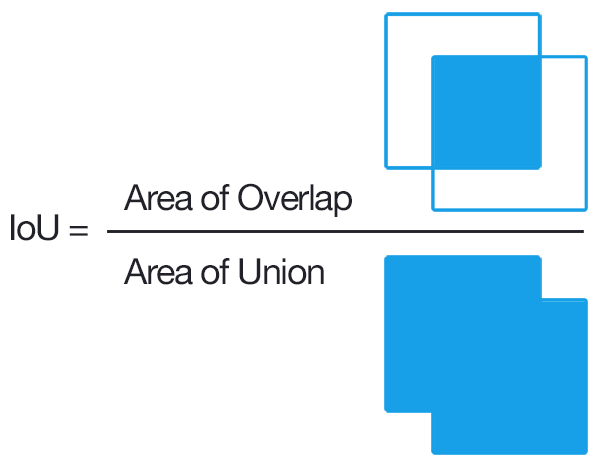 Using this criterium, we calculate the precision/recall curve. E.g:
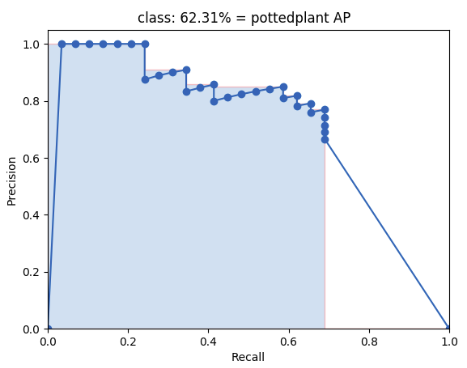 Then we compute a version of the measured precision/recall curve with **precision monotonically decreasing** (shown in light red), by setting the precision for recall `r` to the maximum precision obtained for any recall `r' > r`.
Finally, we compute the AP as the **area under this curve** (shown in light blue) by numerical integration.
No approximation is involved since the curve is piecewise constant.
#### 2. Calculate mAP
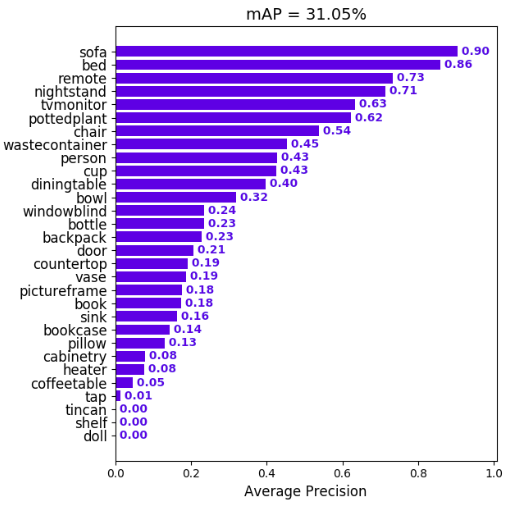
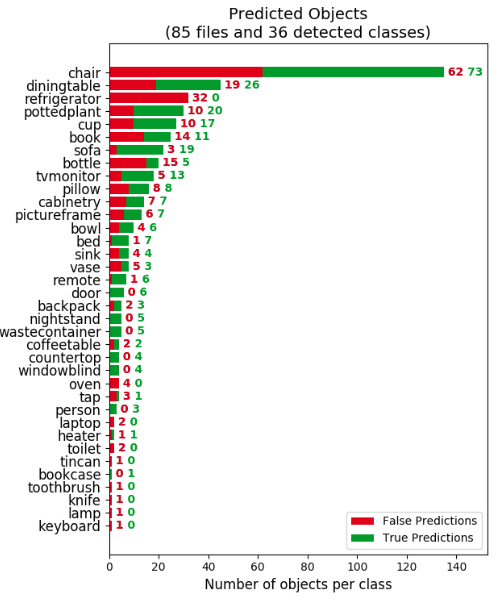
We calculate the mean of all the AP's, resulting in an mAP value from 0 to 100%. E.g:
Then we compute a version of the measured precision/recall curve with **precision monotonically decreasing** (shown in light red), by setting the precision for recall `r` to the maximum precision obtained for any recall `r' > r`.
Finally, we compute the AP as the **area under this curve** (shown in light blue) by numerical integration.
No approximation is involved since the curve is piecewise constant.
#### 2. Calculate mAP
We calculate the mean of all the AP's, resulting in an mAP value from 0 to 100%. E.g:
 ## Prerequisites
You need to install:
- [Python](https://www.python.org/downloads/)
Optional:
- **plot** the results by [installing Matplotlib](https://matplotlib.org/users/installing.html) - Linux, macOS and Windows:
1. `python -mpip install -U pip`
2. `python -mpip install -U matplotlib`
- show **animation** by installing [OpenCV](https://www.opencv.org/):
1. `python -mpip install -U pip`
2. `python -mpip install -U opencv-python`
## Quick-start
To start using the mAP you need to clone the repo:
```
git clone https://github.com/Cartucho/mAP
```
## Running the code
Step by step:
1. [Create the ground-truth files](#create-the-ground-truth-files)
2. Copy the ground-truth files into the folder **input/ground-truth/**
3. [Create the detection-results files](#create-the-detection-results-files)
4. Copy the detection-results files into the folder **input/detection-results/**
5. Run the code:
```
python main.py
```
Optional (if you want to see the **animation**):
6. Insert the images into the folder **input/images-optional/**
#### PASCAL VOC, Darkflow and YOLO users
In the [scripts/extra](https://github.com/Cartucho/mAP/tree/master/scripts/extra) folder you can find additional scripts to convert **PASCAL VOC**, **darkflow** and **YOLO** files into the required format.
#### Create the ground-truth files
- Create a separate ground-truth text file for each image.
- Use **matching names** for the files (e.g. image: "image_1.jpg", ground-truth: "image_1.txt").
- In these files, each line should be in the following format:
```
[]
```
- The `difficult` parameter is optional, use it if you want the calculation to ignore a specific detection.
- E.g. "image_1.txt":
```
tvmonitor 2 10 173 238
book 439 157 556 241
book 437 246 518 351 difficult
pottedplant 272 190 316 259
```
#### Create the detection-results files
- Create a separate detection-results text file for each image.
- Use **matching names** for the files (e.g. image: "image_1.jpg", detection-results: "image_1.txt").
- In these files, each line should be in the following format:
```
```
- E.g. "image_1.txt":
```
tvmonitor 0.471781 0 13 174 244
cup 0.414941 274 226 301 265
book 0.460851 429 219 528 247
chair 0.292345 0 199 88 436
book 0.269833 433 260 506 336
```
## Authors:
* **João Cartucho** - Please give me your feedback: to.cartucho@gmail.com
Feel free to contribute
[](https://github.com/Cartucho/mAP/graphs/contributors)
## Prerequisites
You need to install:
- [Python](https://www.python.org/downloads/)
Optional:
- **plot** the results by [installing Matplotlib](https://matplotlib.org/users/installing.html) - Linux, macOS and Windows:
1. `python -mpip install -U pip`
2. `python -mpip install -U matplotlib`
- show **animation** by installing [OpenCV](https://www.opencv.org/):
1. `python -mpip install -U pip`
2. `python -mpip install -U opencv-python`
## Quick-start
To start using the mAP you need to clone the repo:
```
git clone https://github.com/Cartucho/mAP
```
## Running the code
Step by step:
1. [Create the ground-truth files](#create-the-ground-truth-files)
2. Copy the ground-truth files into the folder **input/ground-truth/**
3. [Create the detection-results files](#create-the-detection-results-files)
4. Copy the detection-results files into the folder **input/detection-results/**
5. Run the code:
```
python main.py
```
Optional (if you want to see the **animation**):
6. Insert the images into the folder **input/images-optional/**
#### PASCAL VOC, Darkflow and YOLO users
In the [scripts/extra](https://github.com/Cartucho/mAP/tree/master/scripts/extra) folder you can find additional scripts to convert **PASCAL VOC**, **darkflow** and **YOLO** files into the required format.
#### Create the ground-truth files
- Create a separate ground-truth text file for each image.
- Use **matching names** for the files (e.g. image: "image_1.jpg", ground-truth: "image_1.txt").
- In these files, each line should be in the following format:
```
[]
```
- The `difficult` parameter is optional, use it if you want the calculation to ignore a specific detection.
- E.g. "image_1.txt":
```
tvmonitor 2 10 173 238
book 439 157 556 241
book 437 246 518 351 difficult
pottedplant 272 190 316 259
```
#### Create the detection-results files
- Create a separate detection-results text file for each image.
- Use **matching names** for the files (e.g. image: "image_1.jpg", detection-results: "image_1.txt").
- In these files, each line should be in the following format:
```
```
- E.g. "image_1.txt":
```
tvmonitor 0.471781 0 13 174 244
cup 0.414941 274 226 301 265
book 0.460851 429 219 528 247
chair 0.292345 0 199 88 436
book 0.269833 433 260 506 336
```
## Authors:
* **João Cartucho** - Please give me your feedback: to.cartucho@gmail.com
Feel free to contribute
[](https://github.com/Cartucho/mAP/graphs/contributors)